Migration to Atlassian Cloud
Support for Data Centre is set to end in March 2029. For organisations still operating in on-premises environments, now is the time to start planning a migration to Atlassian Cloud.
A migration to Atlassian Cloud doesn’t start with the tool itself: it starts with how your organisation works. It’s not just data that’s being moved; it’s permission models, integrations with corporate systems, automations built up over the years and, in many cases, technical debt that the migration can either resolve or carry forward if not done properly.
At Xeridia, we have spent nearly two decades helping our clients with consolidations of multiple tools, corporate splits, highly customised environments and those with stringent regulatory requirements. The assessment is the starting point, but the project isn’t complete until the resulting environment performs better than the original one.
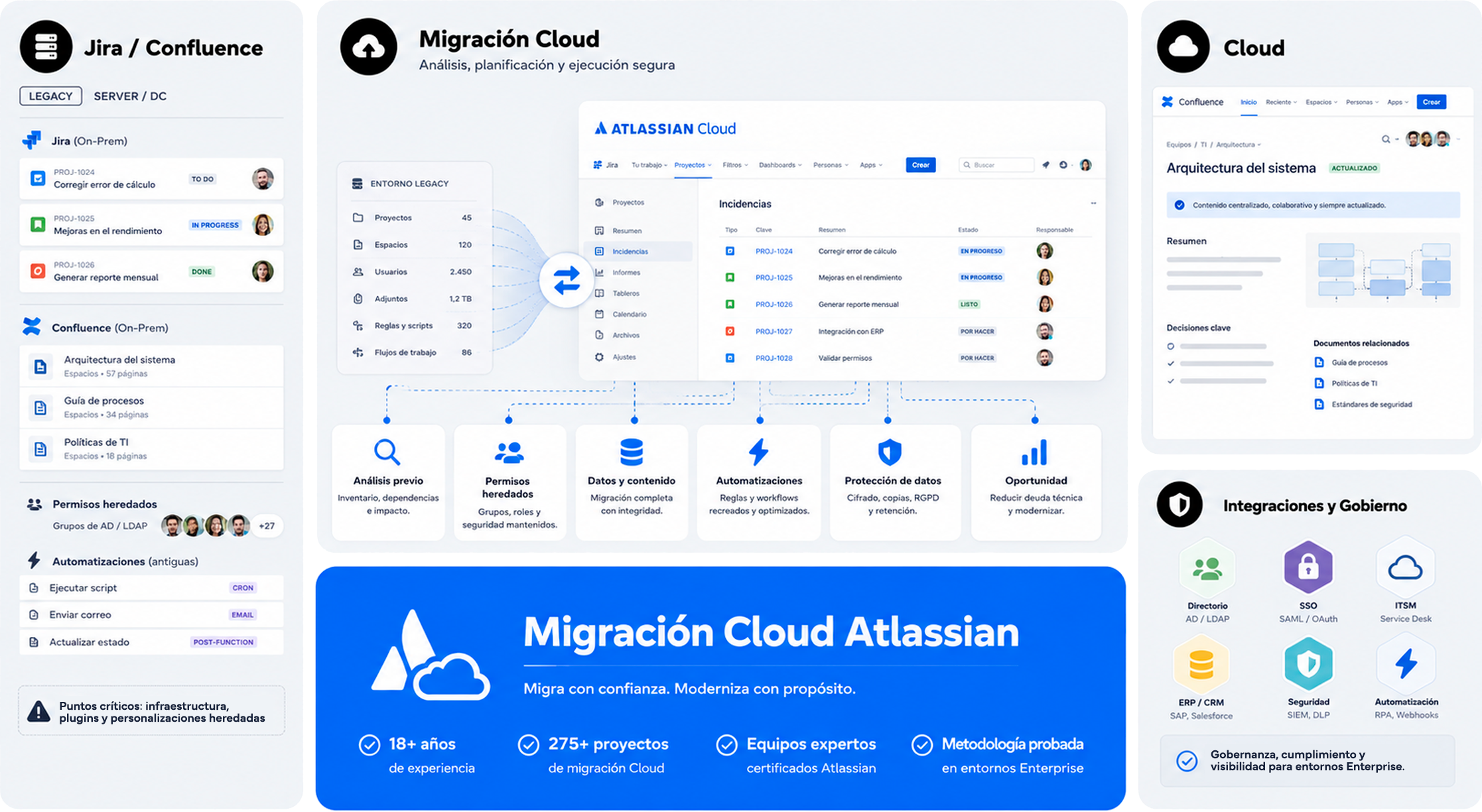
Steps for migrating to Atlassian Cloud with Xeridia
Consultancy and assessment
We take stock of your current setup: active projects, apps, integrations and automations, so that planning is based on real data, not estimates.
Strategic planning
We design a phased migration plan tailored to your organisation: project prioritisation, dependencies, implementation windows and success criteria.
Technical migration
We carry out the migration of data, configurations, permissions and integrations using our own tools and those from Atlassian, minimising the impact on day-to-day operations.
Validation and testing
We verify the integrity of the migrated data and validate workflows, permissions and automations to ensure that everything works as expected.

Production deployment
We deploy the cloud environment into production with real-time guidance, dedicated support and active communication with the teams involved.

Stabilisation
We monitor the environment during the first few weeks, resolve any issues and adjust settings to ensure optimal performance.

Continuous optimisation
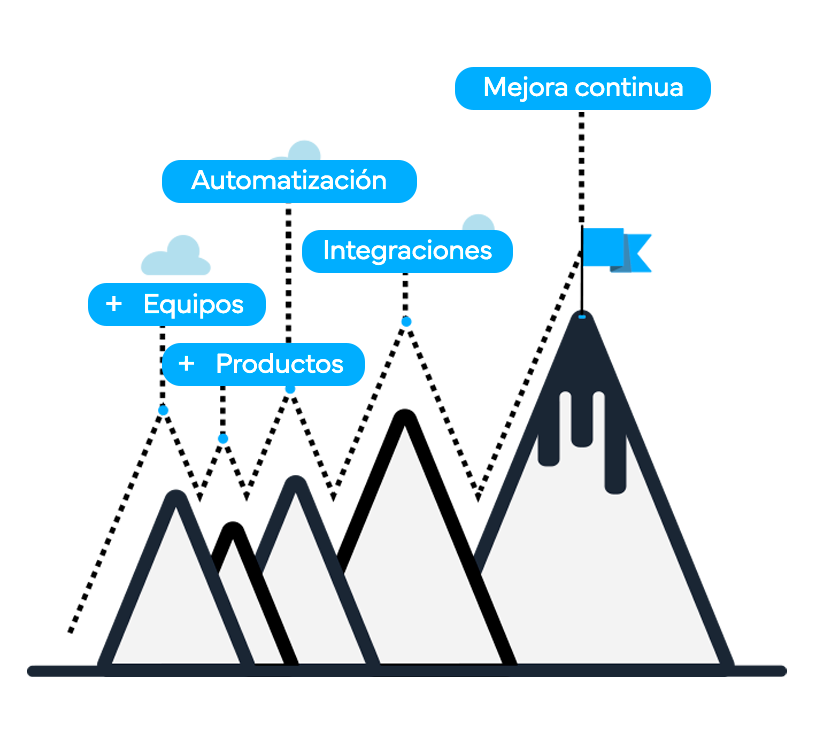
We review how the environment is being used and propose improvements in governance, automation and AI integration to maximise the return on investment in the cloud.
Success stories of Atlassian migrations with Xeridia
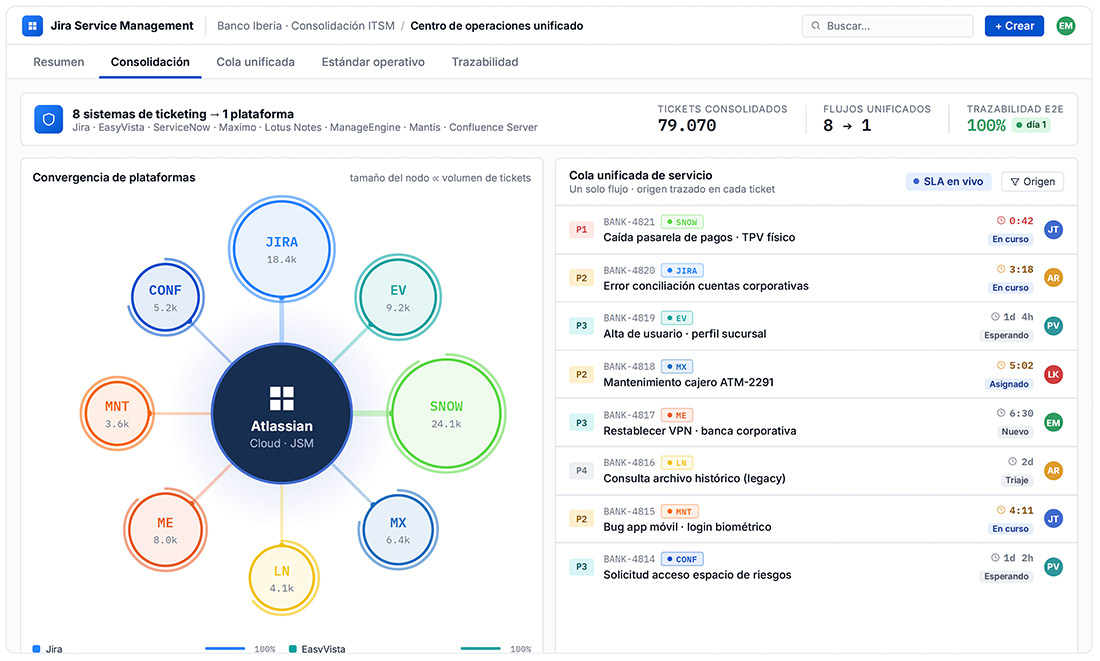
Consolidation of eight different ticketing tools onto a single cloud platform
The challenge
A bank was operating eight ticketing systems in parallel: Jira, EasyVista, ServiceNow, Maximo, Lotus Notes, ManageEngine, Mantis and Confluence Server, with no real integration between them. Each channel had its own workflows, its own data and its own logic. No one had a complete overview of anything.
What we did
We migrated and consolidated all operations onto Atlassian Cloud, standardising processes and unifying the management model. The work was not just technical: we had to agree on an operational standard that made sense for all the teams involved, with end-to-end traceability from day one.
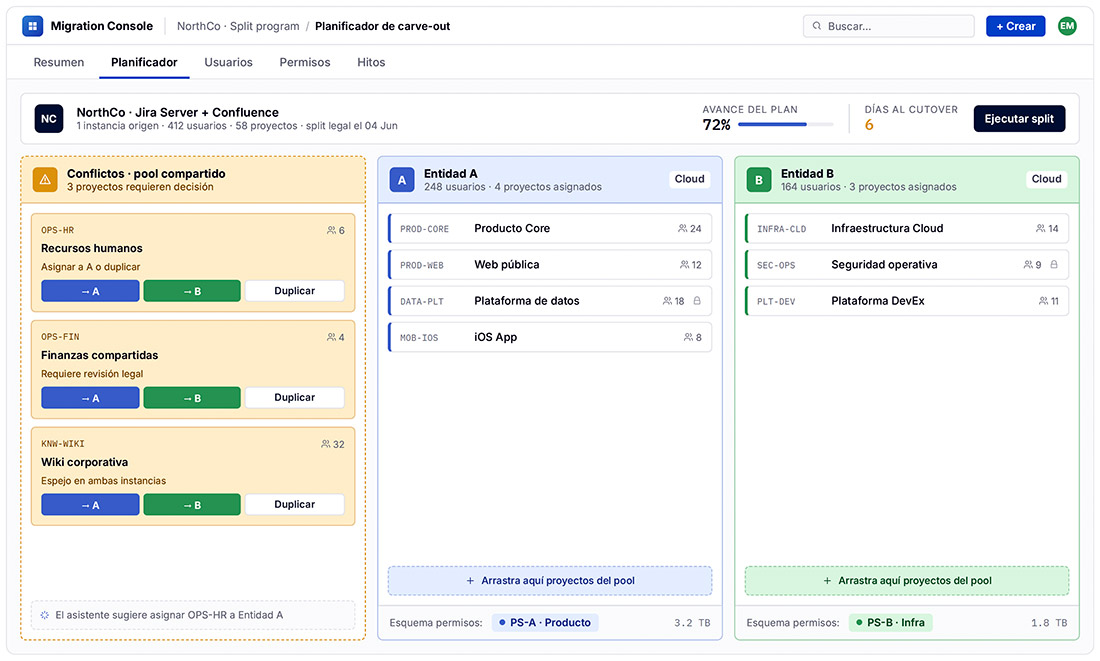
Corporate split with dual migration to the cloud
The challenge
A technology company was splitting into two independent entities, requiring a migration to the Cloud from the two on-premise instances of Jira and Confluence. Everything that had previously been shared—projects, users, permissions, automations and integrations across the two Jira and Confluence instances—had to be separated without either party losing operational capability, and within a fixed legal deadline that could not be extended.
What we did
We designed the governance and access model for both entities: user reassignment, redefinition of permissions and visibility settings, and a transition plan with clear milestones to ensure effective separation without leaving anything in limbo.
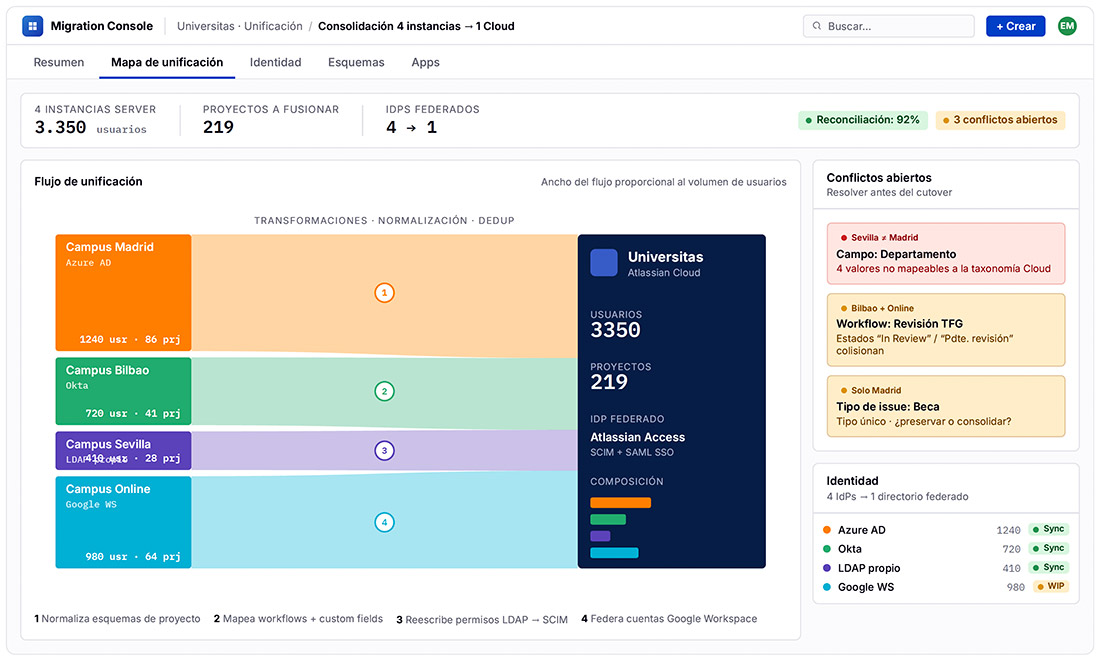
Consolidation of four Server instances into a single Cloud environment
The challenge
Four Server instances with bespoke developments, disparate configurations and different databases, each with its own identity provider. Consolidating them was not just a migration: it was about standardising years of independent evolution into a coherent model.
What we did
We migrated everything to a single Jira/Confluence Cloud environment, reorganising schemas, resolving the coexistence of different IdPs and rebuilding database integrations using Cloud apps—which did not exist in Server—to keep critical workflows and connections operational.
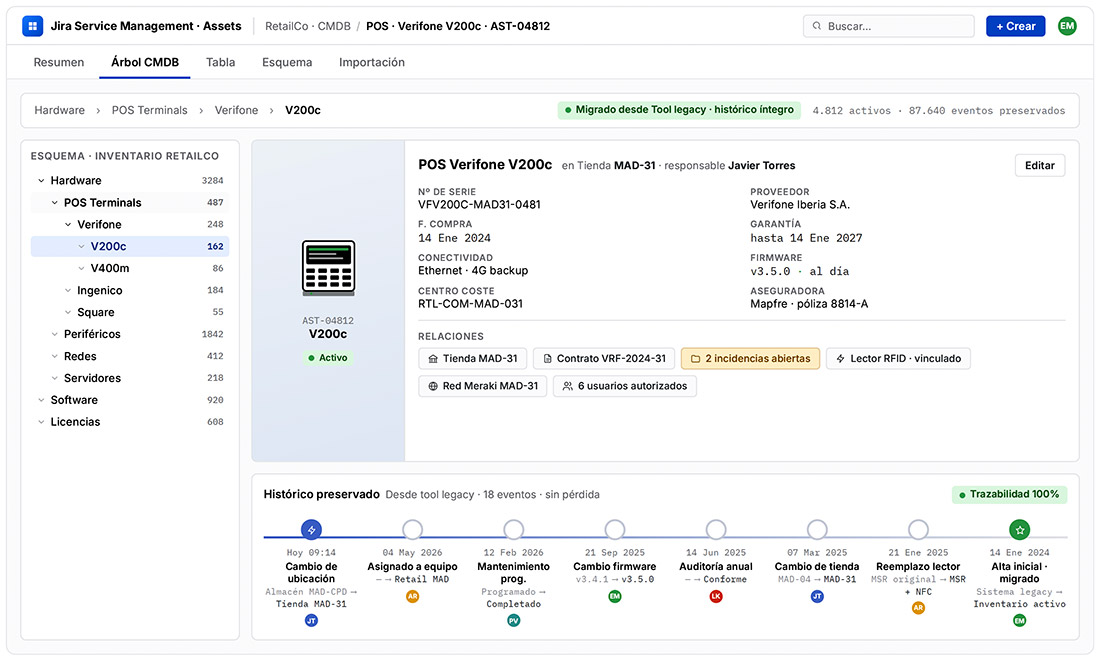
Migration of asset management to Jira Cloud with Assets
The challenge
The company managed its assets using an in-house tool, with years of historical data and a level of detail that any standard solution would struggle to match. Migrating to Jira Cloud without losing that traceability — which underpinned audit and monitoring processes — was a non-negotiable requirement for the project.
What we did
We designed a strategy to migrate the asset history whilst preserving the same level of detail and consistency as the previous solution, and we incorporated Assets management into Jira Cloud as a functional replacement that is more maintainable in the long term.
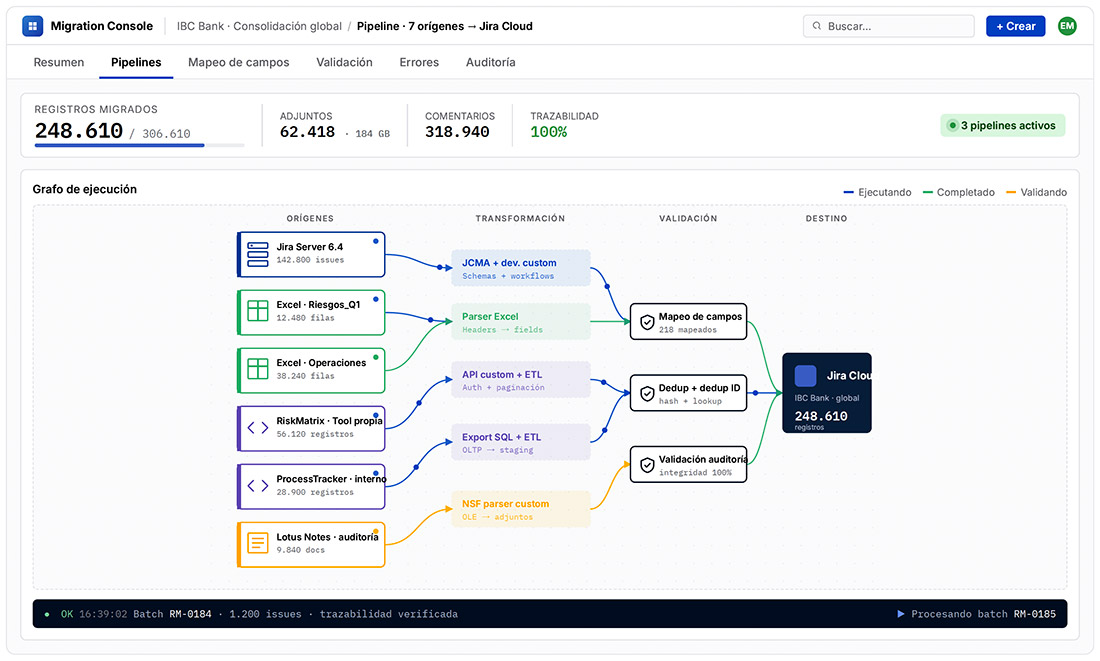
Consolidation of outdated instances in Jira Cloud
The challenge
A particularly complex starting point: severely outdated Server instances, processes documented in Excel, and bespoke tools with no possibility of standard migration. Only one instance allowed for a direct migration; the rest required rebuilding the functionality from scratch in the Cloud.
What we did
We consolidated all operations into a single Jira Cloud instance using bespoke developments for data migration, preserving what was essential: historical data, comments, attachments and full traceability of each process.
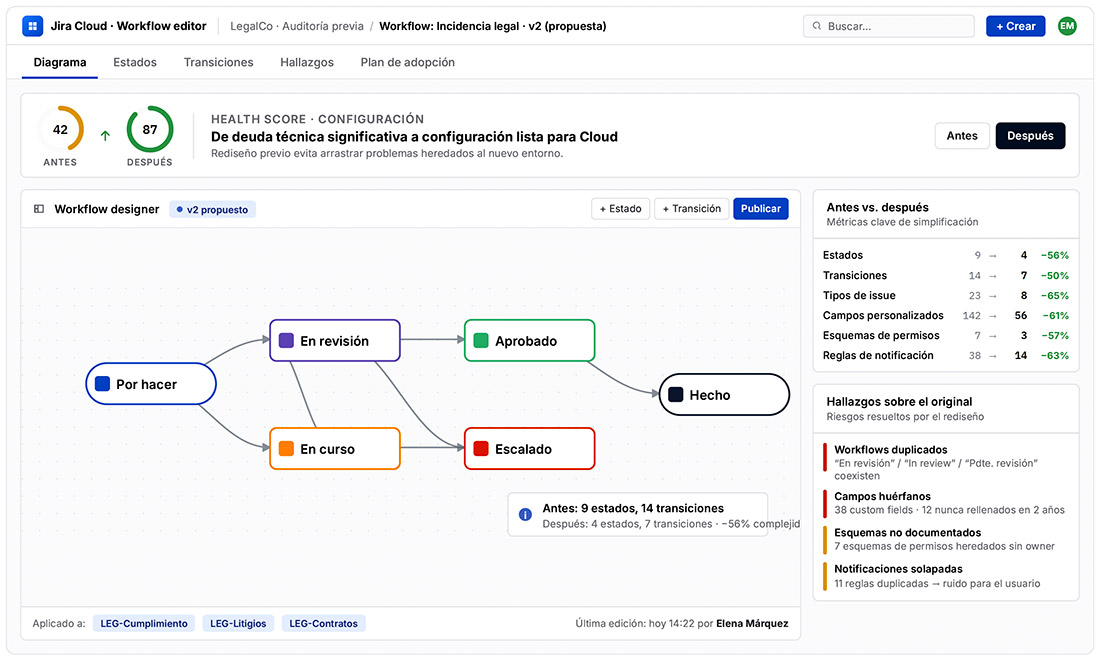
Redesign and migration to the Cloud with a focus on best practices
The challenge
A company in the legal sector was using Jira, but its configuration had grown haphazardly: deviations from best practices, unnecessarily complex workflows, and a user experience that was hindering adoption. Migrating the instance as it stood would simply have transferred the problem without resolving it.
What we did
Before migrating, we conducted an in-depth analysis of the existing configuration and the client’s actual needs. We redesigned the Jira configuration to align it with Atlassian best practices and the team’s way of working, not the other way round. The result was a Cloud environment that was more intuitive, easier to maintain and consistent with the patterns the client required.
Not ready to migrate?
That’s not a problem.
We’ll maintain your environments while you decide.
Migration isn’t always possible. If you have security or regulatory restrictions, or you simply need more time, we’ll stay by your side maintaining your on-premise or Data Center instances.
Frequently Asked Questions about Atlassian Cloud Migrations
What does a migration to Atlassian Cloud from Data Centre actually involve?
The goal should not be to clone what you have in Data Centre. In a successful migration, capabilities change, technical constraints shift and the way you operate the platform evolves. Replicating your on-premises configuration as-is is usually the first mistake: before migrating, you need to decide what to keep, what to simplify and what to redesign from scratch, as well as redefine your governance model (permissions, visibility settings and responsibilities across IT, security and business teams).
What are the most common mistakes in an Atlassian Cloud migration?
The most frequent one is arriving without a proper inventory: active projects, apps in use, integration dependencies, automations and scripts. This is followed by the absence of a clear owner per area (who decides, approves and maintains), underestimating the cleanup work involved (duplicated fields, unused workflows, inherited permissions) and failing to allow time and a plan for communication, training and post-launch stabilisation.
How do you reduce team resistance to an Atlassian Cloud migration?
By involving key teams from the diagnostic phase, not at the end of the project: new workflows are designed with them, not for them. Training is also planned by user profile, because a platform administrator has very different needs from a business user managing tickets. Support does not end at go-live: the first weeks of live operation are when the most questions arise and when adoption is either consolidated or lost. When there is no change management plan, a migration can go technically flawlessly and still be perceived as a failure.
What happens to the customisations, plugins and automations accumulated in Data Centre when you migrate to Atlassian Cloud?
There is no 1:1 correspondence between what exists in Data Centre and what is available in Cloud. Many Data Centre Marketplace plugins have no Cloud version, and even when they do, they do not behave in the same way. Automations or scripts that rely on direct access to the database or file system cannot be transferred as-is. Replicating them all in Cloud is often not possible, it tends to generate additional cost and simply carries the same technical debt across to the new platform.
The approach, therefore, is not to produce a checklist of customisations, but a proper inventory: what has a native Cloud equivalent, what can be covered by a Marketplace app, and what, when no standard alternative exists, requires bespoke development.
Is it better to migrate to Atlassian Cloud all at once or in phases?
In phases, with criteria defined before you start: what is essential from day one, what can go into the backlog and in what order things should be tackled. This way, testing (both technical and with key users on real use cases) forms part of the process rather than being a final formality. Migrating quickly into an environment without sufficient control costs more to fix afterwards than planning properly from the outset would.
What security aspects are typically overlooked when planning an Atlassian Cloud migration?
Security and identity management. Infrastructure becomes Atlassian's responsibility, which forces a rethink of areas that were previously taken for granted. The direct LDAP/AD integration used in Data Centre translates to SSO with SAML and automatic user provisioning via SCIM in Cloud. The permissions model also changes, and Atlassian Guard adds a layer of control that needs to be configured from the start. Additionally, in regulated sectors, data residency is managed through Atlassian's Data Residency feature, a matter to be validated with legal and security teams.
Are historical data, comments and attachments lost when migrating to Atlassian Cloud?
No, but it requires careful decision-making: not all historical data adds value, and some of it may simply be accumulated noise. Losing relevant history, or migrating it incorrectly, has real consequences: issues without context, decisions without evidence and processes that cannot be justified in an audit. Depending on the data source, migration may be straightforward or may require bespoke work: data transformation, field mapping and reconstruction of relationships between issues, attachments and approval trails.
What distinguishes a technically correct Atlassian Cloud migration from an excellent one?
A correct migration meets the technical objective: the data is there, the systems work, users can operate. That is necessary, but not sufficient. It is excellent when the resulting environment is better than the original, not just equivalent: when the opportunity is used to standardise processes, define governance and eliminate technical debt. If, after migrating, users work more effectively and IT manages more efficiently, it was excellent; if it simply works, it was correct.
What does Xeridia's Atlassian team bring to this type of project?
Certified professionals in the Atlassian ecosystem with experience in migrations, implementations, integrations and bespoke development. The difference lies in cross-functionality: having DevOps, AI and bespoke development capabilities within the same team makes it possible to address, without relying on third parties, the needs that almost always arise beyond the platform itself: automation, integration with corporate systems, identity management and advanced reporting. This is reflected in both deadlines and outcomes.
+18 years as an Atlassian Solution Partner+500 projects completed
The highest level of Atlassian partnership, for partners with the greatest volume of projects, proven technical expertise and exclusive licensing terms for our clients.
The accreditation that enables our teams to maximise the performance of Atlassian tools such as Jira Service Management and your IT environments.
Proven expertise in managing cloud migrations, deployments and product optimisation in Atlassian Cloud environments.
